Enrollment Guide
Description
For an end user who has an account at an institution, but has no Online Banking account, a user may enroll in Online Banking with NetTeller or Episys, as well as create a Banno User.
You can find the API Docs here.
Enrollment Session Progress
During Enrollment, which consists of, at a high level, the following steps:
- Verify information (TIN, Account Number, Phone and Email) is correct
- Sign up and verify 2FA Code
- Create a username and password
consumer-enrollment is the web service that’s responsible for handling HTTP Requests to enroll a user and keep track of a user’s progress through Enrollment.
States
Running the following query against the consumer_enrollment database on the postgres-jabberwocky server
SELECT unnest(enum_range(NULL::session_status_type))
provides this information:
consumer_enrollment's Database Enum | Enrollment Report Status | Description
------------ | ------------ | -------------
 generic_failure | Server failure | error occurred, most likely an internal server error (HTTP or RPC). consumer-enrollment, despite retries (which apply in some cases), it was dead in the water due to this error.
 lookup_authentication_failed | Lookup authentication failure | failed to enroll or send code for 2FA
 lookup_institution_not_found | Institution not found | did not find institution id
 lookup_phone_number_not_matched | Phone number doesn't match | request's phone number did not match phone number in the core for that user
 lookup_too_many_requests | Too many attempts | user is rate limited due to too many attempts by TIN or IP
 lookup_user_already_enrolled | User already enrolled | user is already enrolled in Online Banking, so the user cannot proceed through enrollment
 lookup_user_not_found_in_core | User not in core | did not find user in the core
 lookup_success | Lookup success | successful verification of user at host.
 oob2fa_incorrect_code | 2FA incorrect code | user entered the wrong 2fa code
 oob2fa_authentication_failed | 2FA failure | failed to send 2fa code again, i.e. the user requested another code to be sent, but that re-send failed
 oob2fa_success | 2FA success | user verified 2fa code successfully
 enroll_lacked_oob_authentication | Not authenticated | user has attempted to enroll, via POST /enrollment, but hasn't verified 2FA code. This indicates a defect with Enrollment's software. Please open a customer issue.
 enroll_credentials_violated_rules | Invalid credentials | user tried to enroll, but their username or password violated one or more username or password rules
 enroll_netteller_failed | Netteller failure | failed to enroll user in online banking via NetTeller due to a, most likely, BSL error
 enroll_episys_failed | Episys failure | failed to enroll user in online banking via Episys
 enroll_success | Enrolled | user enrolled successfully
 lookup_invalid_symx_member_number | Unknown error | user's request included an invalid Symx Member Number, i.e. wrong format.
 lookup_user_restricted_from_enrollment | Unknown error | user is restricted from using enrollment since institution has restricted that user. Today restrictions apply by age and individual only. See institution_abilities.
 lookup_unknown_age | Unknown error | the institution has enforced a minimum age to enroll, however the core does not have an age for the given user.
 memo_mode_enabled | Unknown error | credit union user is unable to proceed since the credit union is undergoing maintenance
 unable_to_check_memo_mode | Unknown error | encountered an error when trying to determine if the credit union was in memo mode
 lookup_age_not_old_enough | Unknown error | user's age does not meet the minimum of the institution.
(22 rows)
lookup_user_restricted_from_enrollment
The lookup_user_restricted_from_enrollment status applies when an FI restricts Enrollment to individuals only.
Kibana will report that error in the following way:
EnrollmentWorkflow.initiate failed with
UserRestrictedFromUsingEnrollment(CustomerSearchElement(...,None,Some(I)),
An enrolling user is considered to be an individual if jXchange’s CustSrch shows TINCode and CustType
values of "I" and "I".
Since the above user does not have a TINCode, i.e. None, then that user is not an individual.
In addition, users may enroll in Banno if the FI would like ForeignReportable and ForeignNonReport to be able to
enroll. That requires a minor code change on Espresso’s end.
               TINCode, CustType
      case (Some("F"), Some("I")) => ForeignReportable
      case (Some("G"), Some("I")) => ForeignNonReport
Rate Limiting
Banno Enrollment rate limits users via its own database, as well as via NetTeller.
| Feature | Core Type | Max by IP | Max by Tax Identification Number(TIN) |
|---|---|---|---|
| Enrollment | NetTeller | N/A | N/A |
| Enrollment | SymXchange | 50 | 5 |
| Account Recovery | NetTeller | 50 | 5 |
| Account Recovery | SymXchange | 50 | 5 |
Note that, for NetTeller Institutions, Banno achieves Rate Limiting via the BSL’s VerifyHostCustomerEnrollment. In the event a user has become rate limited, BSL will respond with, effectively, user not found. As a result, when a user becomes rate limited for Banno Enrollment, the MDS API, via POST /enrollment/lookup will return with an HTTP-404. In other words, once a NetTeller Institution’s enrolling user has been rate limited, further attempts will return in an HTTP-404.
Furthermore, for NetTeller institutions, rate limiting occurs only by tax ID, and once a user has been rate limited, that restriction may be reset on the NetTeller Host for the respective tax ID.
Once a user has met the “Max by IP” or “Max by TIN” rate limits, that user is then not allowed to re-try for 24 hours. Note that either rate limit is independent of one another.
Technical Details
The following serves as a technical overview of Enrollment.
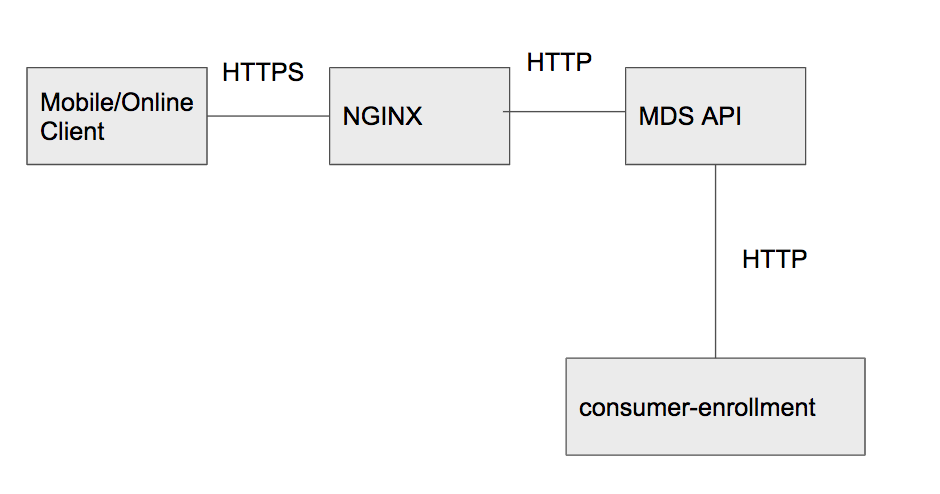
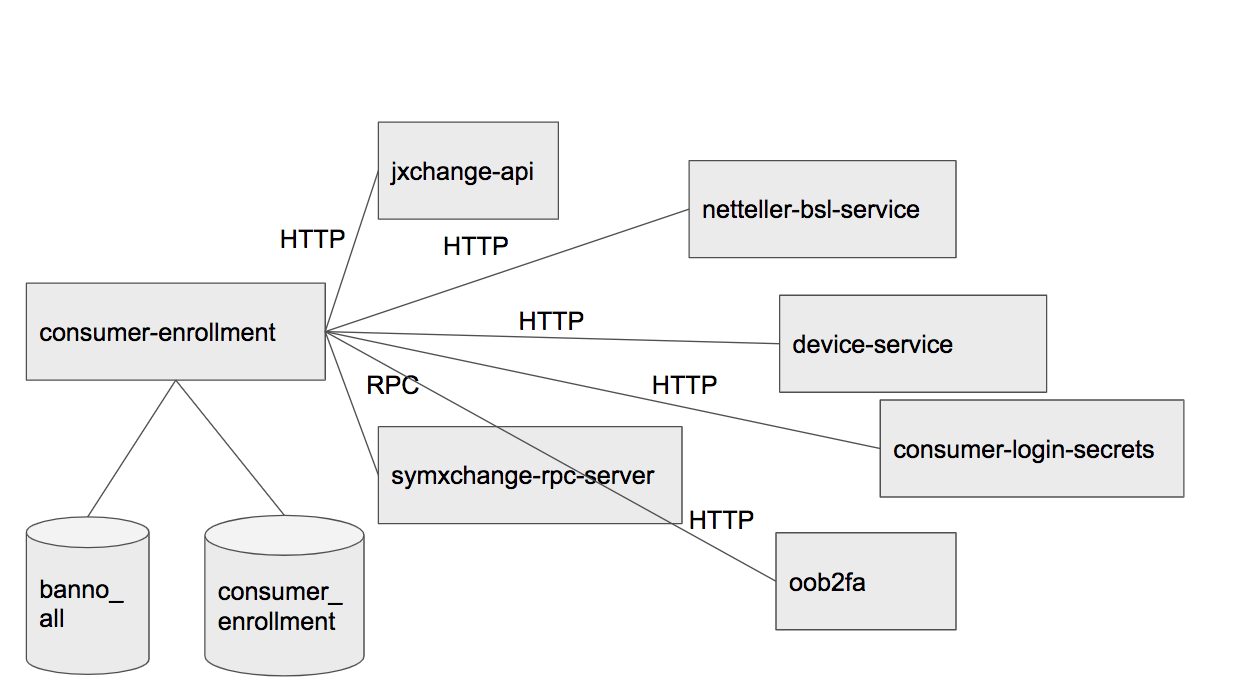
There is an for a version of these diagrams as an editable Google Slide. The API Docs for Enrollment live in this Swagger file on GitHub.
POST /enrollment/lookup
The purpose of this endpoint is to determine if the user, whose details are presented in the HTTP Request, is eligible for Enrollment.
The following steps happen, in order:
- From the request, look up in
banno_alldatabase whether theinstitutionIdis a SymXchange or NetTeller Institution - [SymXchange only] Check if the user is presently rate limited by TIN or IP. See above section on Rate Limiting for more details
- [SymXchange only] Check if the Credit Union is in Memo Mode. Effectively it means that it’s in maintenance mode and cannot presently handle Enrollment requests.
- Look up the user in core, i.e. SymXchange or BSL
- [NetTeller] Get a list of Customer IDs (CIFs) via
jxchange-apifor the user’s request-provided TIN - [NetTeller] For each CIF, look up its details via
jxchange-api - [NetTeller] Pick the first CIF whose phone number matches the request-provided phone number
- [NetTeller] Check restrictions, namely whether the FI only allows individual users to enroll and whether the user is old enough
- [NetTeller] Verify the the user is eligible to enroll via
netteller-bsl-service - [SymXchange] Validate the provided SymX Member Number. There’s a refined type used in
consumer-enrollmentfor it. - [SymXchange] Verify the the user is eligible to enroll via
symxchange-rpc-server
- [NetTeller] Get a list of Customer IDs (CIFs) via
- Increment the user’s enrollment attempt in
consumer_enrollmentdatabase’srate_limittable. - Enroll the user in 2FA via
oob2fa - Send a 2FA code via
oob2fa - Create a JWT, custom to Enrollment (note that Account Recovery has its own JWT)
- Respond with an HTTP-202, prompting the user to enter the
oob2fa-sent 2FA code, including the JWT in a response header
Note that the purpose of the JWT for Enrollment is to achieve authentication, as well as to keep state to maintain, effectively, a session. It is valid for 10 minutes and includes JSON state, e.g. whether the user verified their 2FA Code, etc.
Database Queries
All Enrollment attempts are recorded in the consumer_enrollment database. To debug a customer issue, querying the database can be useful.
Queries
Find enrollment attempts by email
select status, message, attempted_at at time zone 'EST'
from sessions
join session_progress using (user_id)
where lower(email) = lower('<replace with email>')
and institution_id = '<replace with institution id>'
order by attempted_at desc;