General Info & Tips
Our teams search Banno logs using Kibana. This includes logs for interactions between Banno services and other products through jXchange, SymXchange, NT BSL, etc., but also logs from internal Banno services. If you need a more basic guide on how to use reporting tools, you can also check out Institutions and Users General Info.
Due to volume, not everything logs for every customer. There’s a configuration controlling whether we log out all jX/SymX requests for an FI. When it’s disabled, generally only requests with an error are logged. For banks and credit unions, you can see in DS Reporting on the institution details page if logging is enabled for jX requests. You’ll need db access to see if logging is enabled for SymX requests (by querying postgres1>banno_all>institution_symxchange_configs.log_interaction_always).
- In UAT, logs are generally available for seven days.
- In PROD, logs are generally available for 3-4 weeks, sometimes less.
- It’s best to search with filters whenever possible. Keep reading…
Narrow Your Search
Banno has a large number of services, so if you can narrow down your search filters, you’ll have the best results when searching Kibana. We suggest narrowing your search by:
Time Frame
Search the smallest possible time frame to achieve the result you need. Sometimes you won’t know exactly what time period to search, but if you do, use it.
Timestamps
Kibana typically displays timestamps in your local time zone. If it’s not, you can change it in the Advanced Settings. DS Reporting timestamps are always UTC. That mismatch can be a pain.
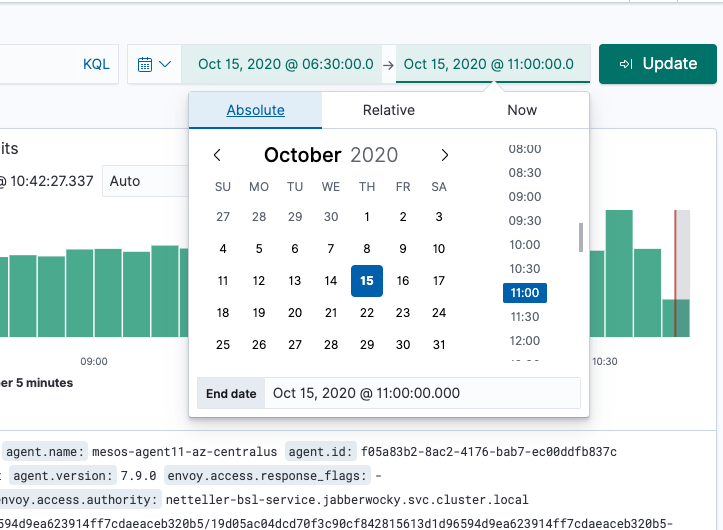
- Absolute
Use Absolute to specify an exact start date/time and end date/time.
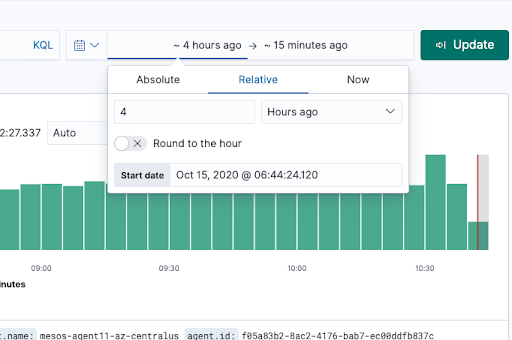
- Relative
Use Relative to specify a relative time period.
- Now
- Use Now to set the start or end time.
- Use Now to set the start or end time.
Filters & Sample Saved Searches
- app_name
- Jxchange requests are usually core-fetch or jxchange-api
- BSL requests are usually netteller-bsl-service
- SymXchange requests are symxchange-rpc-server
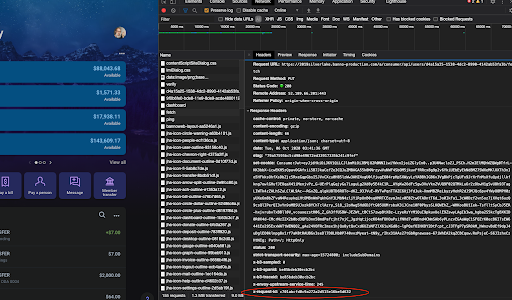
- x-request-id
Copy value out of your browser and paste into the x-request-ID
Here are some sample saved searches that may be useful, but you can add or subtract additional filters as needed. The searches you need will vary depending on what you data you already have versus the data you’re trying to find.
- General - JX by Request or RTN
- General - BSL by Operation and NT FI Number
- General - BSL Interactions by NTID
- General - x-request-ID
- General - SymX by Request and Username
- General - SymX Poweron Requests
Major Requests Made for Every Core Bank Login/Sync (not in order)
BSL
- Authenticate
- API Guide with error codes
- Verify username/password with NetTeller.
- Called twice (once to verify creds and once with older BSL method to “touch” NTID and prevent dormancy even when users don’t enter password on mobile sync).
- Includes username (when verifying creds at login only), NTID (in both versions of the call)
- GetAccount
- GetNetTellerCustomerAccount
- NTID status
- Includes NTID (and CMID when applicable)
- GetCustomerTransferAccount
- Most account entitlements and transfer entitlements
- Includes NTID (and CMID when applicable)
- GetNetTellerCustomerAccount
jXchange
- IntnetFinInstIdInq
- Legacy method of getting NTID account and transfer entitlements, still needed for a couple things even for FI’s on the new method.
- This call can actually fail the /login (not just the /fetch).
- Includes NTID
- IntnetFinInstIdUsrInq
- Not supported for CIF 20/20
- CM held status for ESI SSO.
- CM held status during login comes from the BSL GetNetTellerCustomerAccount.
- AcctSrch
- Accounts by CIF, used for getting CC account entitlements and a couple minor things.
- Includes masked CIF formatted as CustId>XXX1234
- AcctInq
- Account balance, status and other details
- Includes masked account number formatted as AcctId>XXXX1234
- Account type formatted as AcctType>D
- AcctHistSrch
- Account transactions
- Called twice for most accounts (once to get memo posts, once for hard posts).
- “MemoPostInc>Only” included in request for memo posts.
- Includes masked account number formatted as AcctId>XXXX1234
- Account type formatted as AcctType>D
- CustInq
- Get CIF details from core for profile (name, address, phone, etc).
- Includes masked CIF formatted as CustId>XXX1234
- XferSrch
- Get AFT and ACH transfers from core to display on the Scheduled list
- Happens on sync but not part of /fetch
- Includes masked account number formatted as AcctId>XXXX1234
- Account type formatted as AcctType>D
- Type of transfer formatted as:
- XferType>Xfer for internal immediate transfer
- XferType>Fut for future-dated or recurring transfers - core AFT system
- XferType>ACH for external transfers (micro-deposits, immediate, future-dated or recurring) - core ACH Auto Transfer system
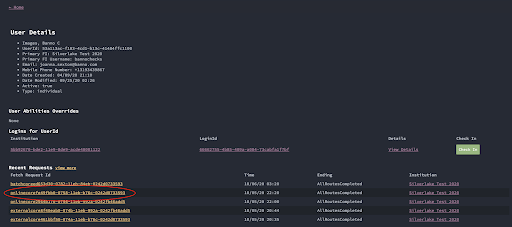
jXchange requests that are associated with the /fetch should include the fetch request ID in the message body. You can find the fetch request ID in DS reporting by looking up the user and then copying the request ID from here: