DEPRECATED: Refer to the current documentation at Software Development Life Cycle (SDLC) Checklist
How to Create a Pull Request
Nearly everything you do, from writing code to creating documentation, will be merged into our repositories via pull request. If you have never used pull requests before, refer to GitHub’s documentation on the subject.
We follow a few guidelines for how we create and merge pull requests. You may create your pull request at any time along development. If you are simply looking for feedback and are not ready to merge yet, simply put a Work in Progress tag- [WIP] - before the title of your pull request. This lets people know you are actively looking for feedback.
Your description should include a link to the relevant Trello card for context on what you are building, as well as a small description with relevant information needed to read the code. This may include a list of other pull requests this one depends on, a description of what is needed for a WIP project, or anything else you deem necessary. For example, your WIP pull request might look like this:
Title:
[WIP] Fixing Malformed User IDs

Description:
https://trello.com/c/example/123-duplicate-user-info

An edge case in user creation could duplicate User IDs. This should cover that scenario- comments are appreciated.
Depends on: https://github.com/Banno/example-project/pull/42
Any pull request without the [WIP] tag is considered ready to merge. To ensure that code gets reviewed before going into master, all pull requests need a separate approval from a different engineer than the submitter before getting merged. Engineers should be spending time each day monitoring, commenting on, and approving pull requests. If your pull request requires faster movement, post a link in a relevant Slack room and let people know it needs approvals.
Merging Pull Requests
Often you want to merge a pull request. Merging is a great show of progress for development as it signals a hunk of work is done. However, there’s more to getting your code deployed than just merging. It must pass through the Banno Build Pipeline which builds all our libraries and projects in their order of dependencies. After the build pipeline there’s getting a deploy to staging. For the Banno Mobile DS stack there’s a suite of jenkins jobs which work to deploy the code with automated testing around the deployables as well. We always try to only merge new pull requests (for the Banno Mobile DS Stack) when both of these are passing.
Note: This is only to merge PRs not related to deployments. banno-deploy and chef-repo PRs are generally merged by script. You can read all about that here
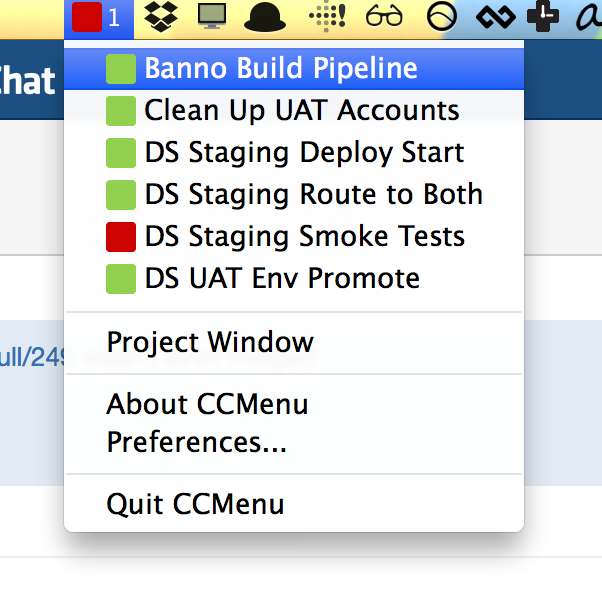
We’ve found that CCMenu is a useful tool for knowing when the builds are passing. It’s free and easy to setup:
- After downloading and installing CCMenu, if you open the app it should drop you into the ‘Projects’ window.
- Click the ‘+’ at the bottom of the window and it will ask for a ‘Feed url’. Give it jenkins.dev.banno-internal.com
- It will then ask you which projects you want to add to your CCMenu. You can add any number of projects using shift-click by selecting the head and tail of the list you want to populate the app. An example of selected jobs is below.
- Now you can see the status of any of the jobs at a glance! If any one of them are failing, the icon will turn red (and give a number for the number of jobs failing).
Here’s an example of some jobs you can add and track: