How To Theme A View
The theme system makes use of UIAppearance under the hood. The primary way to theme an item is to use an existing subclass for labels, images, cells, etc. There is a library of available themed UIKit components in the Banno/Global/GenericUI folder. When working with a xib or a source file that uses a UIView which needs to be themed (say, a title label), then in most cases you can just set the subclass type in the xib or source file (eg UILabel -> TitleLabel) and you’ll be done.
Migrating from the old BNTheme system
As you come across themed items using the old theme system with BNThemeController references, you may find a view that doesn’t have a subclass in the GenericUI folder yet. In that case, you will want to create your own. First look at the BNThemeTemplate.plist file to see what theme keys (or renderers) are used to theme a UI component. You can then create a new reusable modern theme UIView subclass which implements ThemeableUIKit and add it to the GenericUI folder. However, if it’s a single-use or very context-specific view that’s used in just one (or a couple) flows then create your custom subclass in the appropriate folder (for example the PinView class on the passcode screen).
Make sure you disconnect/delete the ThemeController outlets from the xib so that the old theme system doesn’t apply the theme any more. You will also want to scan through the source code for any view controllers and views that use the view you’re migrating and delete all themeController.applyTheme(toObjects: themableViews, animated: false) (or a variant) calls. The safest way to do this is to delete the #import "BNThemeController.h" import statement in the Obj-C file and then fix all the compile errors.
When to refactor to Swift and when to use extensions
The theme system makes heavy use of the Swift protocol and type system. Because of this, it’s not compatible with the Obj-C runtime. This means that most theming api code will not be accessible from an Ojb-C class. To get around this you have two options:
Refactor the Obj-C class to Swift
This is ideal from a tech debt perspective, but more unrealistic as it will introduce more bugs. If the class is small and not very complex, try to refactor it to Swift. As a rule of thumb, if the class you’re refactoring is a view, not a view controller, you should consider rewriting it in Swift.
Add a Swift extension to the Obj-C class
This is the most common approach to theming complex classes. Create a Swift extension that implements the ThemeableUIKit protocol on an existing Obj-C type. In most cases all you need to do is implement the class func apply(theme:to:) with the appropriate color keys. (Example: BNValidatableTextField+Extensions.swift)
Gotchas
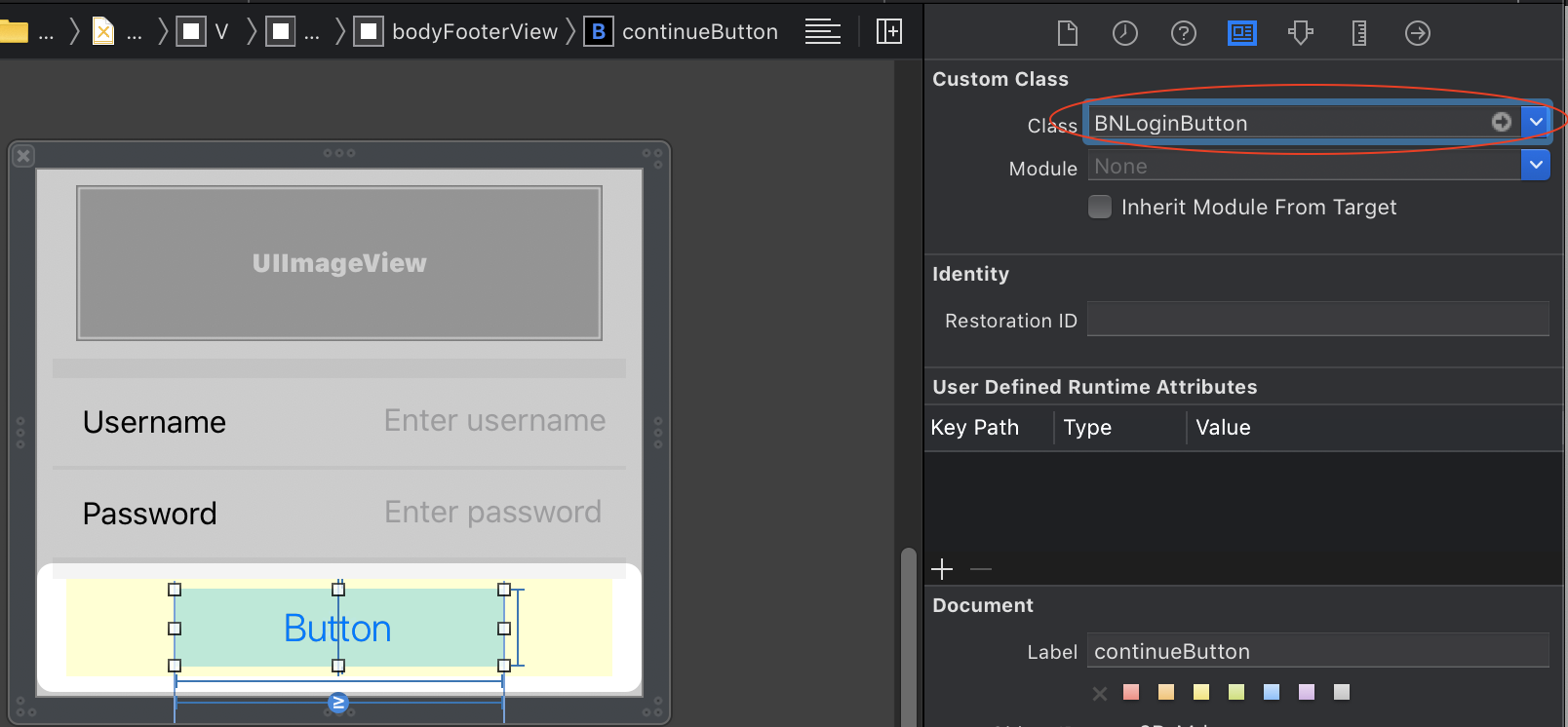
If you are theming a xib file that is backed by Obj-C view controller or view, make sure your themable
UIViewclass names in the xib use the Obj-C name prefix and not the Swift name (and module). Before and after example: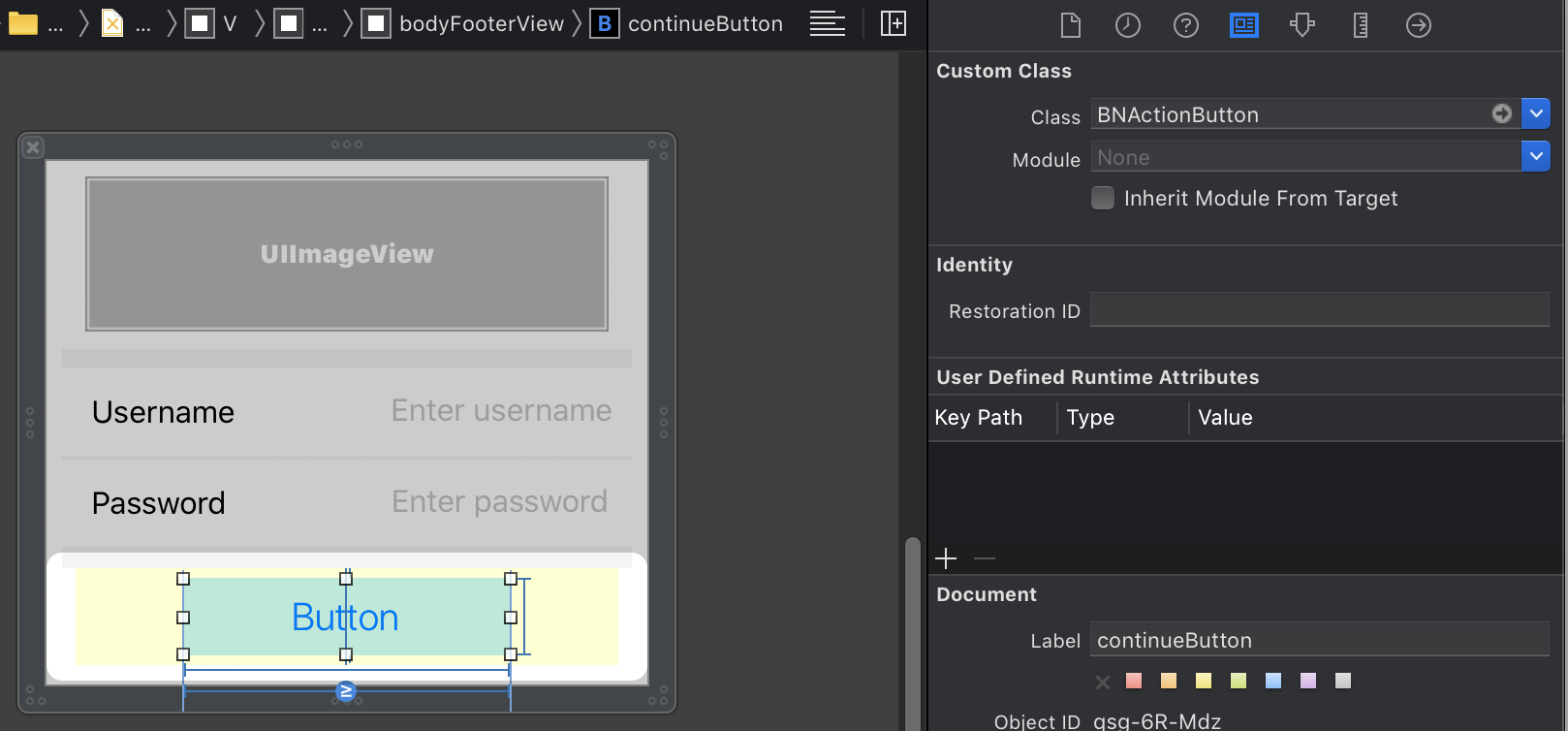
Make sure you register the themed view subclass in
ThemeController+RegisteredUIAppearances.swift. Otherwise the theming won’t take effect (unless you callThemeController.instance.applyCurrentTheme(to:)manually.Read the documentation on
UIAppearance. There’s also some helpful info on NSHipster (as Apple isn’t always clear or complete in their documentation). Some fields on stock apple views do not theme out of the box correctly and can causeEXC_BAD_ACCESScrashes. One example is thatUILabel.textColoris not exposed toUIAppearance. This means that you can’t set a global text color for allFooLabelinstances. You may need to expose fields with some proxy getters/setters so that the view themes correctly. For Swift code this means the field needs to have@objc dynamic varin its declaration (Obj-C code needs theUI_APPEARANCE_SELECTORappended to its declaration). SeeUILabel+UIAppearanceWorkaround.swiftfor an example.Unit testing will often break when refactoring an existing view that used the old theme system to use the current theme system. Many of these unit tests are unecessary and don’t actually test anything helpful (for example, there’s no reason to test that getters and setters did their job by checking the value of the backing ivar). Feel free to remove useless tests (additional reading on what makes a useless test can be found on Steven Anderson’s blog)
Due to the heavy use of OCMock and Obj-C tests and Obj-C testable classes you should always use the Obj-C name of a custom Swift themable view. Otherwise unit tests may fail with bizzare errors like:
testViewWillLayoutSubviews, failed: caught "NSInvalidArgumentException", "-[UIView setWhenActivatedBlock:]: unrecognized selector sent to instance 0x7fdf58837cc0"These errors may not appear locally, but often will show up on Bitrise. Make sure you are testing against the same iOS and Simulator as Bitrise (eg, iOS 12.2 on iPhone 7).
Code Reviewing
If you are reviewing a PR you should run through the following check list to ensure that everything behaves as intended:
- Make sure the class is registered in the
sharedAppearancesarray inThemeController+RegisteredUIAppearances.swift - Note: The developer may have a good reason for why it was not registered, but this will be rare. Some examples are for
UIImageViewsubclasses which colorize the actual bitmapUIImage. This has to be done atawakeFromNibtime, not instantiation (which is whenUIAppearanceapplies the theme) due to the Xib file dependencies. - Make sure the developer is implementing
ThemeableUIKitviaclass func apply(theme:to:)and notstatic func(Xcode autogenerates astaticimplementation 😢) - If the change involves a sub-class, ensure that the developer implements
apply(theme:to:)for the root type, not the sub-class type. (See thePolymorphism Examplesection for more details). - Check to make sure that the themeable Swift UIView subclasses module is set to “Inherit Module From Target” in Storyboard/Xib files, otherwise the theme might not apply correctly even though all code compiles just fine. Be aware, however, that if the container view/view controller referenced in the Xib was written in Obj-C, you do not want to use the “Inherit Module From Target” setting. In that case you want to use the Obj-C prefix name. This is also necessary if the unit tests that rely on the xib file are written in Obj-C. Otherwise you may run into invalid selector issues.
Polymorphism Example
Try to keep your polymorphism to a minimum depth of 1 child class per super-class type for the sake of other developers. Here’s why:
class TitleLabel: UILabel, ThemeableUIKit {
    class func apply(theme: Theme, to element: TitleLabel) {
        element.themableTextColor = theme[.bodyTextPrimaryColor]
        element.themableFont = .preferredFont(forTextStyle: .title1)
    }
}

class SubTitleLabel: TitleLabel {
    @objc dynamic var fooColor: UIColor?
    //Note the type of `element` is the parent class type, not the `SubTitleLabel`. This is because the Swift compiler only calls `apply(theme: Theme, to element: TitleLabel)` on subclasses and doesn't use their native types.
    class func apply(theme: Theme, to element: TitleLabel) {
        super.apply(theme: theme, to: element)
        (element as? SubTitleLabel).fooColor = theme[.bodyTextSecondaryColor]
    }
}

class AlternateSubTitleLabel: SubTitleLabel {
    //Note the type of `element` is the root class type, TitleLabel, not the parent class, SubTitleLabel!! This is because the Swift compiler only calls `apply(theme: Theme, to element: TitleLabel)` on subclasses and doesn't use their native types.
    class func apply(theme: Theme, to element: TitleLabel) {
        super.apply(theme: theme, to: element)
        element.themableFont = .preferredFont(forTextStyle: .title2)
    }
}
Instead your subclassing should be much more flat and look like this:
class TitleLabel: UILabel, ThemeableUIKit {
    class func apply(theme: Theme, to element: TitleLabel) {
        element.themableTextColor = theme[.bodyTextPrimaryColor]
        element.themableFont = .preferredFont(forTextStyle: .title1)
    }
}

class SubTitleLabel: TitleLabel {
    @objc dynamic var fooColor: UIColor?
    //Note the type of `element` is the parent class type because `TitleLabel` has no themable superclass
    class func apply(theme: Theme, to element: TitleLabel) {
        super.apply(theme: theme, to: element)
        (element as? SubTitleLabel).fooColor = theme[.bodyTextSecondaryColor]
    }
}

class AlternateSubTitleLabel: TitleLabel {
    @objc dynamic var fooColor: UIColor?
    class func apply(theme: Theme, to element: TitleLabel) {
        super.apply(theme: theme, to: element)
        (element as? SubTitleLabel).fooColor = theme[.bodyTextSecondaryColor]
        element.themableFont = .preferredFont(forTextStyle: .title2)
    }
}