We are using Scala Steward to automatically submit Pull Requests with dependency updates to our Scala repositories. Previously, this was set as a cronjob in the tools cluster within our kubernetes infrastructure. The config was shared and one instance served all teams. This came with challenges such as:
- rate-limiting by GitHub
- needing to involve infrastructure to deploy any configuration change or rerun the job off schedule
- teams left to figure out the best way to manage their own local configuration of Scala Steward for their repositories outside of the shared config.
To address these concerns, we are migrating to a GitHub Actions-based Scala Steward. Specifically, we are using the diy-steward template.
Each team has been given their own Scala Steward to manage:
Migrating to your new Scala Steward
At the root of your team’s repository, you’ll see a repos.md file. Just like before, you’ll put a list of your repositories which should receive updates in there (this should most likely be all of them).
If your team has >20 repositories, I recommend adding them in groups of ~15, running Scala Steward in between (see Running your Scala Steward below).
- Submit a PR to environments removing your team’s repositories.
- Merge your environments PR after approvals.
- Have infra deploy the changes by asking in #org-dobby for
scala-stewardto be restarted in the tools cluster.- You want to make sure your removals are deployed before your Scala Steward is running as well to avoid potential collisions.
- Submit a PR to your teams Scala Steward adding your repositories.
- If total number of repositories > 20, do this part in batches of ~15 at a time.
- Merge the PR adding repositories to your new Scala Steward repository.
- Either wait for a scheduled run, or manually run your Scala Steward job (see Running your Scala Steward)
- Repeat from Step 4 as necessary.
Operation Notes
Slow Runtimes?
The first time Scala Steward sees a repository, it runs slower on that specific repository. If the entire run of Scala Steward is successful, the workspace is cached in GitHub Actions and subsequent runs will be much faster.
Scala Steward Dies From an Error After an Hour?
The workflow that is running authenticates by generating an App Installation Token. This token lasts a maximum of 1 Hour before needing to be regenerated. There is currently no plumbing in the GitHub Action calling Scala Steward to do this.
Because of this, when initially adding your repositories, it’s recommended to do it in batches of ~15 to make sure your initial run is <60m. After a successful run, the workspace is cached, those repositories will be processed faster, and you can add more.
If you run into this problem well after having an established cache, there might have been some significant change that meant the cache wasn’t as useful anymore. You may need to repeat the process of removing most of your repositories from repos.md and adding them back ~15 at a time.
A note about repos.md
It is not actually parsed as markdown, but is matching each line against a regex. If you want to add all of your repositories to your repos.md file at once and comment them out to add gradually, you’ll need to comment them line-by-line rather than a block comment.
Running your Scala Steward
Scheduling
In .github/workflows/steward.yml you’ll see that Steward runs on a schedule as well as workflow_dispatch (you can run it manually)
The schedule string uses POSIX cron syntax which you can read more about in the GitHub Actions Docs. By default it runs every 4 hours.
on:
  schedule:
    - cron: '0 */4 * * *'
Running manually
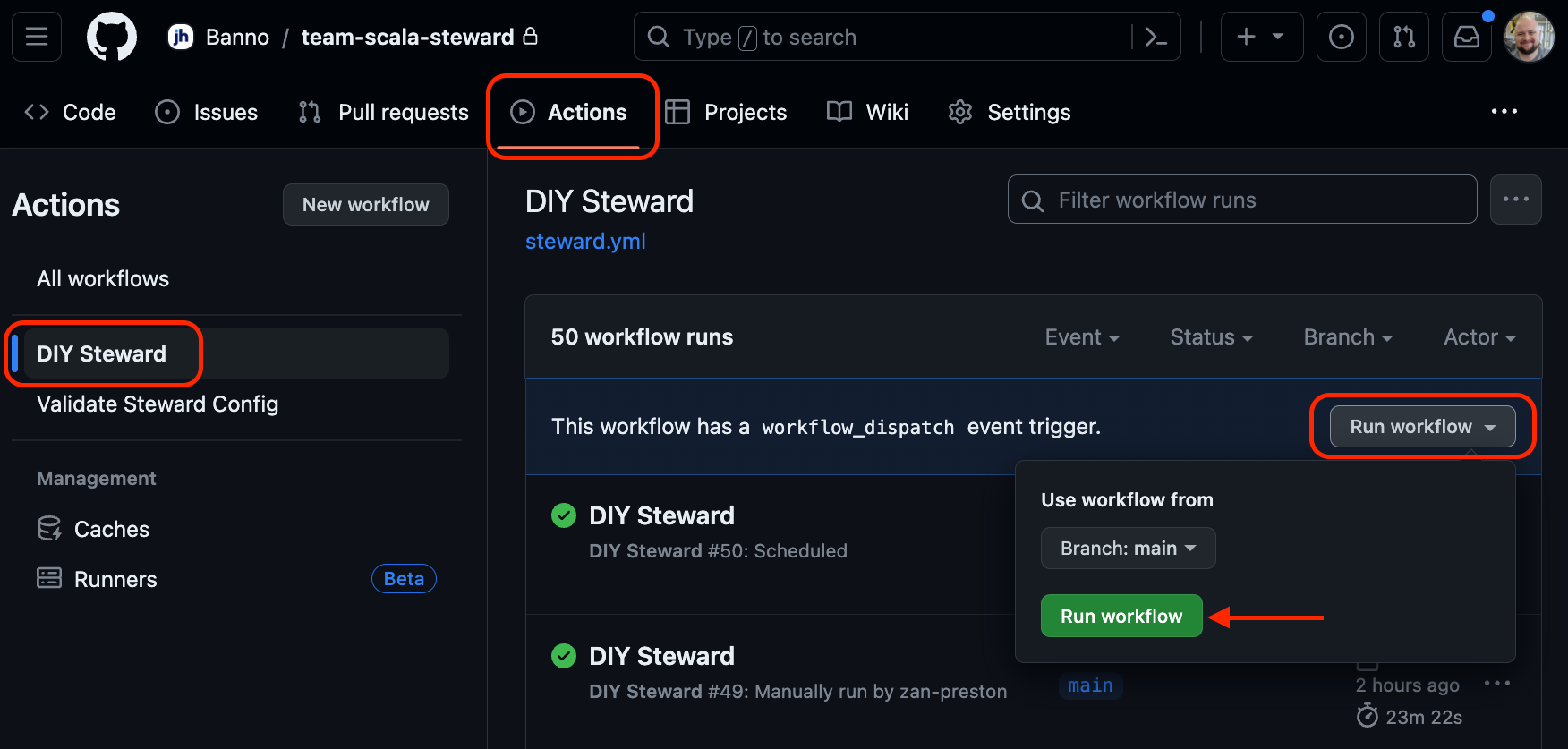
To run manually, from the repository home page, navigate to Actions, select DIY Steward and then under the Run workflow dropdown, select Run workflow (from branch main).
Configuring Scala Steward
If your team has Steward related options which should apply to all of your repositories, they can be set in .github/.scala-steward.conf and should come below the following block.
### BEGIN_COMMON_BANNO_CONFIG
...
### END_COMMON_BANNO_CONFIG
The above block is reserved for organization wide configuration and should not be touched. It will eventually be updated via automation.