Contractors
Welcome!
Install BIG-IP Client.
Open a web browser and go to https://tpa.jhavpn.com.
If it prompts you to select a certificate choose the cert with your username.
Enter your jha credentials, including token password, then click Logon.
Click the link for JHA Edge Client Mac. Locate and extract the .zip file that downloads Go into the extracted folder and double-click the .pkg installer.
Follow the prompts to complete the installation.
You may need to go to System Preferences > Security to allow it to run Open the BIG-IP Edge Client.
Getting Connected
Now let’s get you connected to your server.
Open the BIG-IP Edge Client.
Click on the menu bar icon for it and select Manage VPN Servers…
Click the +, enter the address, then click Create.
The server you are adding is https://tpa.jhavpn.com
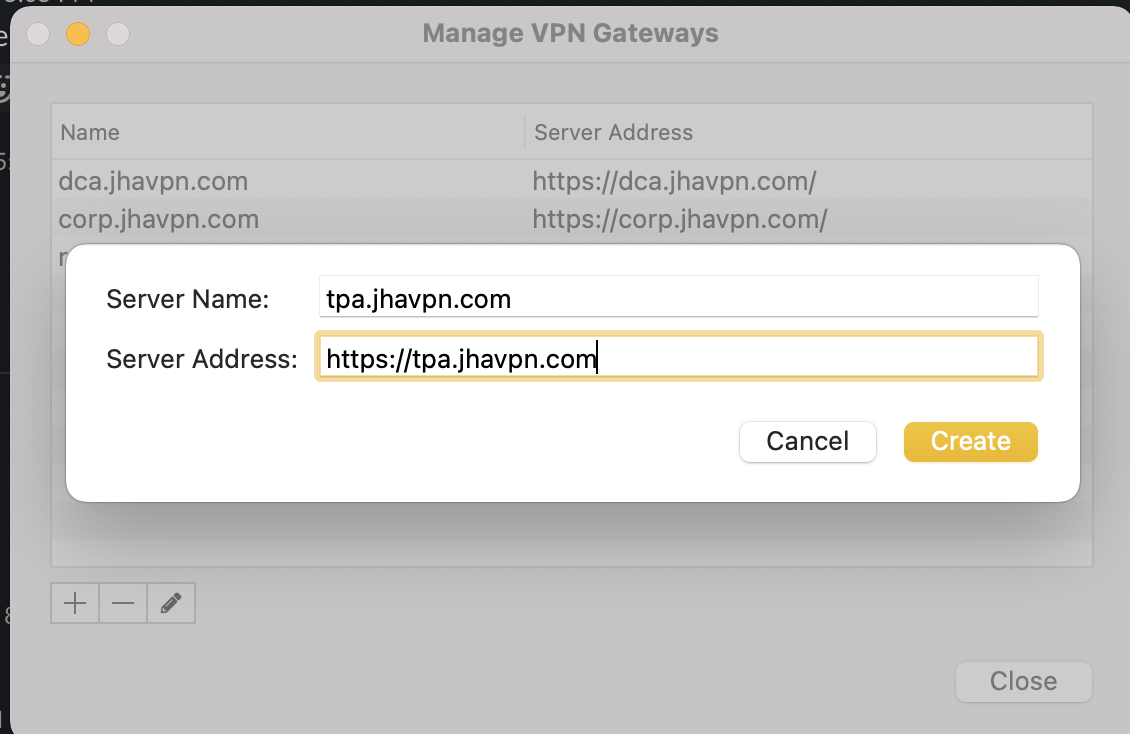
Click Close.
Success! You are all set to step into the world.
If any problems, reach out to for help in Slack #org-ground-control
Managers
Contractor must fill out and return a 3rd Party Acceptable Use form.
Submit a new hire case in service center specifying contractor. The VPN access group to request on the new hire case is CN=JHA-PSA-F5APMVPN-Banno-Contractor