Using Stack Overflow for Product questions
Quick-start guide
You more of a sink or swim type? Great. Let’s circle back to the process details after you join our Jack Henry Stack Overflow community and take a look around.
Here’s a list of the bare essentials you’ll need to get started:
Joining our community
To access our Stack Overflow community, check your Jack Henry email for an invitation to the Jack Henry S/O team.
Don’t see an invite or missed the sign-up window?
Not a problem. Please request an invite in the #org-prod-mgmt Slack channel. Be sure to include your preferred name and your Jack Henry email address, and tag Brit McNamara.
Creating an account
You’ll need to use your Jack Henry email address when creating an account to access our private team. Any Stack Overflow accounts created with a personal email address are not given access to our community.
When a S/O admin invites you to join the Jack Henrey team on S/O, you’ll receive an email to create an account. The following steps will help you create an account:
- In the email invite, click “Join your team” or the direct link that is provided.
- Click “I have an account.”
- Click “Log in with Google.”
- In the Choose an account screen, click the option that has your name and JH email.
- In the Confirm your new account screen, choose if you want to opt-in to receive S/O company information or not. Click “Confirm your account.”
- Type in your first and last name for how you want it display to team members. You can change your picture now or at another time.
- Click “Next step.”
- In the What’s relevant to you screen, click “Finish” (we’ll talk about tags during the onboarding session so you don’t have to choose any tags that display).
- Success!! Your S/O dashboard should now appear.
Feel free to read through some of the questions in S/O. We’ll talk about how to use the platform in an upcoming onboarding session. You can also read Stack Overflow’s 2-minute site tour.
Managing your profile
To view your Stack Overflow profile, click the image icon to the right of the primary search bar, and then click the Your profile tab just below your name and enlarged avatar image.
Please edit your profile by clicking Edit profile. Include your actual job title and team so any co-workers you’ve not met before have an idea of who they’re talking to and what type of info might be most relevant to you.
Searching for answers
The search feature on Stack Overflow is fairly powerful and supports familiar search aides like tags for sorting and book-end quote marks for finding specific phrases. You can also throw a hyphen (-) in front of a tag or search term to exclude it from results or insert an asterisk (*) anywhere in a word to broaden results.
To search and filter similar questions before asking, open our stack and follow these steps:
- To the right of the Stack Overflow logo, click Search and enter your query.
- Just below the Ask Private Question button, click the Filter button and select your filters, including tags.
- If wanted, click the Relevance, Newest, or More tab to further sort your results.
For more about searching on Stack Overflow, see their documentation: Search existing content.
Tag, you’re it
Whether searching, asking a question, or responding, using our established tags and knowing details about tags to narrow the focus will save you time and ensure that the right SMEs see your question.
If an SME is associated with a tag and they have their notifications setup, the SME will be notified of the question by email.
To learn details about tags on Stack Overflow, check out their documentation:
Asking questions
Always remember to ask one question at a time (i.e., each question should have its own title and description). Even if the topic is the same, asking more than one question at once (or as a follow-up comment) does not serve your peers well, because Stack Overflow can only display question titles when someone searches for existing questions & answers before submitting a new question.
To ask a question, open our stack and follow these steps:
- In the upper-right corner of the middle column, click the Ask Private Question button.
- Enter a descriptive title for the question.
Note: If your question is urgent, prepend the title with the word Urgent, like in this example: “Urgent: Can institution employees edit other employees’ permissions?” - Paste and update the Key details template into the description text box.
- Add at least one tag to the Tags field. You can use our established tags or create new tags.
- If needed, mention a moderator team in the Ask team members field.
- If wanted, select the Answer your own question checkbox.
- Click the Post your question in jackhenry button.
A moderator or SME will respond as quickly as possible.
Should I post the question in S/O or open a ticket?
When it comes to asking Product questions on S/O, questions should relate to general functionality around a feature that impacts FIs. If a question or issue is FI-specific (e.g. sounds like a bug) or regards how Engineering built the feature, it does not qualify as a Product question and will typically require following the Customer Issue Management process that Ops leadership created.
A couple things to remember
Following our process helps ensure a smoother-running community. Please take a minute to get familiar with our process: Process overview
As part of that process, we need you to provide crucial context that saves moderators, SMEs, and ultimately you valuable time. This template should make it easier: Key details
To learn more about submitting questions on Stack Overflow, check out their documentation: Ask a question
Answering questions
We’re counting on the whole team to answer any question you can, so please jump in right away if you know part or all of an answer—or if you know who would know.
To answer a question, open our stack and follow these steps:
- Click the question title.
- If needed, update the tags used: Just below the question description, you’ll see a small Tags heading. Click Edit next to the tags, and make your changes.
- In the Your Answer field, enter a detailed answer, being as specific as possible.
- Click the Post Your Answer in jackhenry button.
If the question will benefit other people, click the upvote arrow to indicate that “This question shows research effort; it is useful and clear,” as S/O describes it. Or click Share below the downvote arrow.
Commenting & reacting
To comment on a question thread, open our stack and follow these steps:
- Click the question title.
- If needed, update the tags used: Just below the question description, you’ll see a small Tags heading. Click Edit next to the tags, and make your changes.
- Under the answer (or initial question) that you want address, click Add a comment.
You can also add a reaction to let the asker, answerer, and rest of the community know you found the question or response useful. To learn more about reactions in Stack Overflow, check out their documentation: Add reactions
Getting assistance
There are a few ways to get help for our stack:
- Mention your mods: In most cases, you’ll want to mention the appropriate moderator team, so multiple people receive an alert:
- PM moderators: ProdMods
- Docs moderators: DocMods
- Support T2 moderators: SupMods
- Implementation moderators: ImplMods
- Find your SMEs: We may revisit this later, but for now, please lean on our moderators to mention specific SMEs.
- Request a lifeline on Slack: If your just plain stuck, head to the #org-prod-mgmt Slack channel and ask Joe Donohue to point you in the right direction.
Requesting documentation updates
If the answer you receive (or provide) has either not been documented or should replace incorrect info within an existing doc, please click the Add people button (right below the question description) and add DocMods. Our documentation team will then review and prioritize the request, so we can make the changes as soon as possible. Once we’ve published the info, we will comment on the Q&A thread with a link to the article.
Integrating with Slack
Look, Slack wasn’t perfect, but it had its upside too. For one, it was pretty convenient to pop open the #org-prod-mgmt channel and drop in a question. Luckily, the Slack integration for Stack Overflow makes it easy to blend the convenience of the former with the more powerful search and content health features S/O offers.
We strongly urge you to learn the lay of the land in S/O during your first few weeks using the platform, but you’re also quite welcome to use the #org-prod-mgmt Slack channel to manage the majority of your day-to-day S/O engagement.
- In the message input field, enter /stack followed by ask, search, answer, or notify:
/stack search: Search Stack Overflow for answers to similar questions to avoid asking a duplicate./stack ask: Once you’ve submitted your question, it will be displayed in Stack Overflow and in Slack./stack answer: Answer a question on Stack Overflow without leaving Slack./stack notify: Manage your Stack Overflow (and related Slack) notifications.
- Complete the fields, etc. in the Stack Overflow dialog that opens.
To learn more about integrating Slack with S/O, check out their documentation: Slack integration overview
You can also use keywords to be notified of questions that post in #org-prod-mgmt. As PM or SME associated as an SME with a tag, configuring your Slack notifications with keyword notifications might be helpful to you too.
Onboarding resources
Changes to your daily communication practices can be challenging, if not flat-out frustrating or overwhelming. To help minimize those challenges as you get started with Stack Overflow and get familiar with the JH Digital S/O community, you can lean on our moderators as well as the resources below, which were provided during the onboarding training sessions we held before kicking off the move to S/O.
Training sessions: Under their Umbrella -ella -ella
Whether new to Stack Overflow or simply wanting a refresher on best practices and convenient features, you’ll want to watch this S/O general end uers + Slack enablement onboarding session (password: ?Kk=2gyw) recording from December 2023.
S/O recs
Here are other resource recommendations to help you learn your way around S/O:
- S/O best practices: Why? Because you deserve the best!
- Cultivating an engaged S/O community: Why? Knowledge is like wealth—easy to grow, given you inherit a solid surplus and happen to run in the right circles:
- Good to know Why? I mean, uh… because not bad?
Looking ahead
You will notice a few features in Stack Overflow that we aren’t using quite yet. We’re still working on adding a few things to further improve our stack. Here are some things to look forward to:
- Searching obsolete answers: The move to Stack Overflow involves a migration of dated questions and answers that may no longer be accurate. To support referencing older questions without causing confusion, our archive of Slack #org-prod-mgmt questions will soon be available to search in the Obsolete posts.
- Using Collections: We have plans for collections, and you’ll help shape them: Possibilities for collections
- Additional integrations: Along with Slack, we may integrate S/O with Jira and/or Github at some point.
For a deeper understanding of how and why JH Digital’s Operations and Product teams use Stack Overflow, please see our more-detailed S/O process documentation below.
Why Stack Overflow?
The Jack Henry Digital Operations team manages a high volume of intricately technical support and implementation responsibilities that require a deep understanding of our Product features, functionality, and configuration requirements. While our Product Operations documentation is steadily growing toward the comprehensive resource that we need, Ops members often run into product questions that haven’t been answered in docs.
Our Product and Ops teams have previously made do using the #org-prod-mgmt Slack channel to handle these questions. That process fell short in part because the high volume load made it too easy for moderators to overlook unanswered questions and too difficult for askers to spot duplicate questions that have already been answered.
We can find a better solution. In fact, we have. In the interest of expediting our answers so Implementation and Support can better serve institutions, we’ve opted for the proven benefits of a private team on Stack Overflow. The tool offers a user experience that’s heavy on features and light on hassles.
Armed with this doc as a starting guide, you’ll have our Q&A submission process down pat and be using Stack Overflow like it’s old hat before you know it.
Accessing our Stack Overflow team
The Jack Henry Stack Overflow team is a private community that discusses both publicly available and internal-eyes-only information regarding JH Digital products, configuration and operational processes, and more. Given the sensitive nature of some internal-facing details, access to our stack team will soon require single-sign on authentication via JH Digital’s approved identity provider (IdP).
In our case, the tool is not intended as a primary knowledge repository; rather, it is specifically intended as an internal communication tool that is centrally (though not necessarily exclusively) used by JH Digital Operations and Product teams.
Our Stack Overflow collaborators
The product question process primarily involves the following players:
- Asker: Member of Ops, Analysts, Sales, or Product who submits the question
- SMEs: Any member of Ops, Analysts, Sales, or Product who attempts to answer the question or gather key details that weren’t provided (often, initial responses will come from the asker’s own team)
- Moderators: People designated from various JH Digital teams to review Q&A and provide any details, context, or answers they can. Moderators also track engagement and help facilitate progress toward an answer if a Q&A becomes stagnate before getting resolved.
- Product Management: Additionally, Product moderators will focus on assigning unanswered questions to the specific PM who ‘owns’ the domain/topic.
- Product Operations docs: Additionally, Docs moderators will review and prioritize Q&A details that should be added to the Docs queue.
- T2 Support: Additionally, Support moderators will focus on identifying known issues and potential bugs that should be escalated as customer issues.
- Implementation: Additionally, Implementation moderators will focus on identifying questions related to known configuration nuances.
- Community manager: The acting S/O community manager is responsible for assisting all collaborators, including moderators and SMEs. A co-op of Product & Ops leadership will continue to approve any big decisions our community manager recommends. The honors currently go to Brittany McNamara on the Product Management team.
All pings in Moderate-ion
Note: Please tag moderators as needed, while also keeping a friendly eye on the reality that our willingness to help generally stretches far beyond the time and resources our respective teams have available to commit. Thanks!
Need an assist? If you get stuck or need clarification while using Stack Overflow, mentioning one of our moderator groups should do the trick:
- PM moderators: ProdMods
- Docs moderators: DocMods
- Support T2 moderators: SupMods
- Implementation moderators: ImplMods
After mentioning a moderator group, members will see the alert during their next triage session and respond as quickly as possible.
Remember that while moderators can often share a wealth of knowledge across many areas of the Digital platform, they’re not expected to serve as SMEs for most questions. Instead, our moderators look for ways to keep the info flowing as fast possible without flooding SMEs in a sea of alerts (called The un-Read Sea™, obviously).
For example, rather than pinging an individual SME when submitting a question, you’ll use our tags to get the question in front of informed SMEs. Then, if a question goes untouched longer than our established response times, a moderator will mention the appropriate PM or SME on your behalf.
Process overview
Much like the previous Product Question process for the #org-prod-mgmt Slack channel, our Stack Overflow process involves designated moderators who are scheduled to regularly check for questions that need attention. Right, but what does *regularly* entail in practice?
Because moderators’ schedules and allotted hours are determined with their respective managers, that answer may fluctuate per team and/or individual. We anticipate, however, that each moderator will commit 2 - 4 hours per week for triage and that moderators will alternate shifts, working with the community manager to ensure that triage gets covered for a couple of hours each day.
Out of the gate, we will count on moderators, SMEs, and all other contributors to keep the flow of answers rolling and ensure that our JHA S/O community members get the info and collaborative support we all deserve.
To facilitate timely responses for our teammates and customers, we’ll follow a triage approach similar to our Slack model—as detailed in the JH Digital team Communication Guide and briefly summarized in the screenshot below.
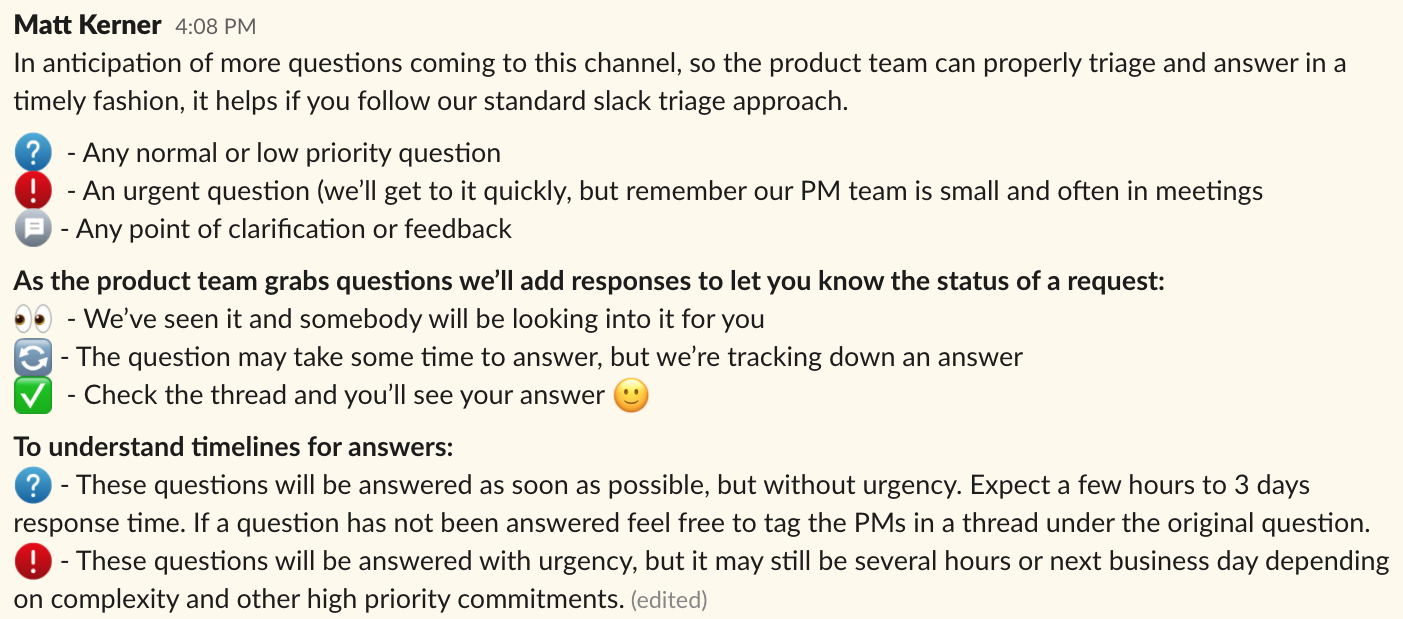
Since S/O doesn’t allow emoji in question titles, we’ll indicate urgency level by prepending our titles, like this:
- Left blank: Any normal or low priority question
- Urgent An urgent question (we’ll get to it quickly, but remember our PM team is small and often in meetings
- FYI: Any point of clarification or feedback
To understand timelines for answers, follow this guide:
- Normal or low priority: These questions will be answered as soon as possible, but without urgency. Expect a few hours to 3 days response time. If a question has not been answered feel free to tag the PMs in a thread under the original question.
- Urgent: These questions will be answered with urgency, but it may still be several hours or next business day depending on complexity and other high priority commitments.
Question submission process
Once you’ve completed the prep process outlined in the #org-prod-mgmt bullet section of the JH Digital Communication Architecture wiki article, you’re ready to submit your question in Stack Overflow:
- Write a clear question title Example: Can institution admins access the Banno config area?
- Copy and paste the Key details template into your question description, and provide any of the key details that you already know.
- Include a clear description of the issue or question.
- Add details for sorting:
- Select Established Tags or add a new tag when necessary
- Mention a moderator group (Only when necessary, please and thank you!)
- Click Post.
- Stay tuned to answer any clarifying questions from SMEs.
- Once someone has provided a clear answer, accept it by clicking the checkmark next to the left of the answer. Accepting an answer lets the community know when you’ve gotten the details you need.
Managing Email alerts
To get email alerts when and how you want them, click the image icon to the right of the primary search bar, and then click the Settings tab below your name. In the left column, click the options under Email Settings and edit your settings as wanted.
SME process
Members of all teams will regularly review the general question queue and respond to any questions they can add provide key details to or answer.
PM moderator process
Twice each week, the Product Management moderators will review their queue to assign questions to the right PM (by adding them) as well as escalate questions to the Documentation team queue as needed.
PM answer process
Twice each week, PMs will review their queue (i.e., questions they’ve been added to or include their tags) to provide answers and to escalate questions to the Documentation team as needed.
Documentation moderator process
Twice each week, each Documentation moderator will review their queue to prioritize and assign articles to the Documentation team. Once the article is available on the Knowledge Base, the writer will comment on the S/O question with a link to the new article or edits.
Key Details defined
As the asker, it’s important to paste the template (bullet list) below into your Stack Overflow question description field and provide as many details as possible.As an SME, PM, or moderator it’s important to comment with any unanswered details you can when reviewing a question.
Our Key details template includes the following fields:
- FI name & type: Specify the institution’s name and type (bank or CU), as these details can help the community connect dots to relevant info—e.g., CU-specific features or potential bugs that may be impacting functionality.
- Existing documentation: Include a link to any relevant documentation you were able to find, and describe what’s missing, unclear, or inaccurate.
- Core: If mentioned in the docs (or you happen to know), specify whether the question involves a specific core. This is not an expectation, but specifying cores when possible is helpful to SMEs and can shorten response times.
- Suggested Knowledge Base section: If there’s no documentation available, where would you expect to find it? For example, https://banno.com/a/help/ > Mobile > Creating Transfers > Micro Deposits
- Known change: If the question regards an upcoming or recently released feature or change, specify when and where (e.g., the public roadmap) you or the FI learned about the feature.
- Testing environment: If this is something that can be tested, what’s the best environment (and credentials) to use, and what did your testing show?
Example of completed Key details
Let's take a look at an example of how this template should look in a typical case:- FI name & type: Kemba, CU
- Existing documentation: None found
- Core: N/A
- Suggested Knowledge Base section: seems like this would be included under card controls, but I don’t see it. docs.banno.com/knowledge//apps/cards/ops/fscc-separate-entity-cc-controls/#credit-card-controls
- Known change: Feature enhancement, release notes
- Testing environment: N/A
- Question: When will the ‘Reporting a lost card’ copy change take effect?
Key details template
Finally, here's the template you can copy and paste into the description field of your question:
- FI name & type:
Name & Bank/CU - Existing documentation:
URL- Core:
if known - Suggested Knowledge Base section:
URL
- Core:
- Known change:
Type of change & source of info - Testing environment:
if applicable - Description:
below
For easy access during your day-to-day workflow, you can also reference the Key details template on Stack Overflow.
Using tags
Each question asked on S/O requires at least one tag. When you include a tag(s) with a question, type out the tag and pause. The Tag field will auto-display a list of similar tags that have already been created. If the tag exists, go ahead and select the tag. If it’s a new tag, consider if future questions could use the tag as well. If so, go ahead and create the tag, If not, see if a similar but different tag has been used.
Below is a list of our established tags for quick reference, as we will want to limit the number of tags by merging some or labeling certain tags as synonyms when submitting product questions in the Jack Henry Stack Overflow.
- Cores
- core-cif-2020
- core-director
- core-episys
- core-silverLake
- Product area
- mobile
- online
- people
- support
- content
- marketing
- monitor
- reports
- config
- settings
- Feature type
- accounting
- autobooks
- intuit
- accounts
- auth
- auth-enrollment
- auth-logins/passwords
- auth-2fa
- auth
- banno-business
- ach
- positive-pay
- user-management
- wires
- bill-pay
- brokerage/investment
- budgeting
- card-controls
- card-management
- check-images
- check-reordering
- cc-accounts
- card-rewards
- credit-score
- documents
- financial-services
- conversations
- loans
- mortgage-loans
- positive-pay
- compliance
- poweron
- rdc
- eps-rda
- eps
- rda
- ensenta
- alogent
- bluepoint
- catalyst-rdc
- tranzcapture
- vertifi
- cachet
- urban-ft
- remote-deposit-capture
- sso
- trust-management
- accounting
Multiple tags associated with a question
Sometimes a single tag is enough for an SME to know they should answer that question, but if two to four tags can be associated to help narrow a question’s domain, feel free to use them.
Tags for Banno Business is one example where multiple tags can (and should) be used to help SMEs and moderators identify who can provide an answer:
banno-businessachbanno-businessuser-management- Etc.
Other examples when multiple tags could be used for a single question include narrowing the type of question regarding Reports:
reportstransfersreportsconversationsreportsbill-pay- Etc.
PMs, SMEs, & Tags
According to the Product Management Domain guide, PMs are associated as a subject matter expert (SME) with tags related to the products and feature sets that they “own.”
Most, if not all, of our moderators have an SME level knowledge around one or multiple feature sets. If an individual is not a PM yet has extensive knowledge around a specific product and/or feature set as an SME, they are also associated as an SME with selected tags so they can help or facilitate an answer.
When you use the tag and the PM or SME set their notifications to receive emails (or watch the tag), they will receive emails notifying them of questions with that specific tag. The question displays in #org-prod-mgmt, but it does not display or ping associated SMEs, nor does it display the tags associated with a question. Slack does not ping individuals in channels or direct messages, BUT S/O will email an individual when one of their associated tags is used or watched (if set-up by the individual PM or SME).
Unfortunately, S/O doesn’t have the ability to view tags associated with an SME at the individual level. To see if an individual is associated as an SME with a tag, you must select the tag.
Check to see if a PM or SME is associated (or not associated) with a tag by navigating to the following:
- Find the Content section in the sidebar navigation.
- Click the Tags sub-section.
- Select the tag you want to view.
- The PM(s) and SME(s) individuals display as a subject matter expert at the top of the screen (X total subject matter experts).
Addition or removal as an SME for a tag
If a tag should or should not be associated with you, please reach out to Brit McNamara. She will manage the tag and your association according to the need.
Notification of tags
S/O will email an individual if one of their associated tags is used or watched. As a PM or SME, the following steps will help setup that change (or confirm you’re already good to go) so you can receive tag notifications by email:
- In S/O, click your avatar.
- Click Account settings.
- Find EMAIL SETTINGS and click Edit Email Settings.
- Scroll down to the jackhenry section.
- For the For you inbox, select 5 min, 3 hours, or Daily for how often you want to receive emails when a question relates to you (tagged, domain tag, answers to your questions and/or comments, etc.). We strive to provide answers with three business days, so choose Weekly at your discretion.
While you’re in the Edit Email Settings, go ahead and update your email from @banno.com to your @jackhenry.com email in these two sections (if you haven’t already):
- Your main account
- jackhenry
Watch tags
As a PM or SME, we recommend you “watch” tags that you are associated with. Watched tags will display in the right-hand side of the S/O dashboard. When you click on the tag, all questions with that tag will then display. To watch tags:
- Navigate to the right-hand side of the S/O dashboard.
- Locate the Watched Tags on jackhenry
- Select Edit.
- Add your tag(s).
- Select how frequently you want to be notified when the tag is used (Never, As soon as possible, or Daily).
If you’re associated as an SME with a tag, S/O automatically adds the tag to your watch list. You can remove a tag from your watch list, but if you’re associated as an SME with the tag, a S/O admin (Brit McNamara) needs to disassociate you from the tag.
Integrations
Currently, we’re only rolling with the Slack integration for Stack Overflow. We’ve got some additional options to consider, though.
For a look at other integrations we’re considering for S/O, check out these demos:
Collections
We have plans for the Collections feature; however, we’d like to monitor our Jack Henry S/O community for a month or so and see if our usage behavior points to any use cases for collections that we haven’t predicted.
Prospective plan
We’ll use collections as entry points to various paths through the product knowledge shared on Jack Henry S/O community.
Here’s an example of one such path:
- Content organized based on relevancy to Role
- End user: Bank or Credit Union member
- Agent: Bank or Credit Union employee with limited permissions
- Admin: Bank or Credit Union employee with the Manage everything permission
- 3rd-party developer: Bank or Credit Union developer (or independent developer) who uses the Digital Toolkit to build tools that integrate with Banno
- Banno support: Internal admin with comprehensive access to People and Config
- Banno implementation: Internal admin with comprehensive access to People and Config in both UAT and Production environments
- Banno QA: Internal admin with comprehensive access to People and Config in both UAT and Production environments
- Banno Sales: We’re exploring whether this tool is a good fit for Sales.