What is an incident?
Incidents are anything that negatively impacts the customer experience, service performance, or service availability. That can be for a single customer or many.
As it stands right now starting an incident is a judgment call by the acting firefighter or anyone who discovers a degradation of services. It’s always better to start one as a false alarm than to wait too long or not start one at all.
It’s important to inform our customers and other stakeholders when we experience service degradation with our products. If we fail to see or acknowledge issues we run the risk of losing trust with our customers, and legally can have monetary ramifications.
What happens during an incident?
The goal of any incident should be four pronged:
- Return our service to working order, first and foremost.
- Collect information on the cause of the incident to help in fixing the causes of the issue.
- Customer Communication
- Root Cause Analysis to recap what we did well, what could have gone better and identify any planned work as a result of the incident to prevent future incidents.
How do we communicate during an incident
- As much as possible all written communication during an incident should occur in the temporary Slack channel that was created by the Incident bot. Although Google Meet has chat features they are not nearly as robust, will be lost when the call ends; and having two locations to check for written communication will burden the group during an incident.
- A written history of theories suggested, discoveries made, and actions taken is critical to the incident analysis steps later in this process. The temporary Slack channel provides an excellent running journal of who did what, at what time, for what reasons. Trying to remember these details after the fact leads to gaps that impair the learning and improvement process.
- Video communication should occur in Google Meet as much as possible. The exception is if another JH team outside Digital is needed. At this point the incident falls under the ERO process and it is preferred that we switch to Teams to better support the ERO process.
How do we classify severity of incidents?
The Enterprise Resilience Office (ERO) Incident Management team has a Priority Matrix for assessing incident severity, based on urgency (or severity) and impact. We try our best to follow these guidelines, but very often when an incident starts we don’t have a good understanding of the scope of the problem. We encourage all staff to use their best judgement when opening an incident, knowing that we can retroactively define these values when we have better information.
| Severity | Incident Management Definition |
|---|---|
| Critical | • Full business operations stoppage - critical application or service. • Reputation critically impacted. • Crisis event that negatively impacts Jack Henry (natural disaster, declared cyber security incident, etc.) |
| Major | • Operations and/or service degradation that severely slows business functions (nearing non-functional). • Reputation significantly impacted. • A cyber security event that affected critical systems or has a significant impact on business operations. |
| High | • Operations and/or service degradation but operations at a slower than normal pace. • Moderate impact on business operations, potentially affecting non-critical systems due to a cyber security event. |
| Medium | • Minor impact on business operations, affecting non-essential systems. • Minor impact on business operations, affecting non-essential systems due to a cyber security event. |
| Low | • Degradation in experience but not to operations. • Minimal impact on business operations, affecting non-essential systems due to a cyber security event. |
| Impact | Incident Management Definition |
|---|---|
| Widespread | • 250 or more Jack Henry Associates impacted • 250 or more Jack Henry Clients impacted • 5 or more Regional Bank Clients impacted |
| Large | • 100-249 Jack Henry Associates impacted • 100-249 Jack Henry Clients impacted |
| Limited | • 10-99 Jack Henry Associates impacted • 10-99 Jack Henry Clients impacted • Any Jack Henry office location |
| Localized | • 1-9 Jack Henry Associates impacted • 1-9 Jack Henry Clients impacted |
When declaring incidents using Incident.io, Severity is mandatory and Impact is optional.
When closing an active incident using Incident.io, both Severity and Impact will be mandatory.
Personas During an Incident
During an incident there are various roles that are filled. Some of these roles are fulfilled by specific people but some of the roles can be fulfilled by anyone.
- Initiator
- Incident Coordinator
- Scribe
- Engineer
- Support
Our incident process documentation is broken out based on the persona of the person that is responding.
Initiator
Role: Initiate / Start the incident via the Incident Bot
Who: Anyone. If you see something you think is weird don’t be afraid to start an incident so that others know.
- Begin new incidents with the Incident Bot in Slack. Documentation can be found here
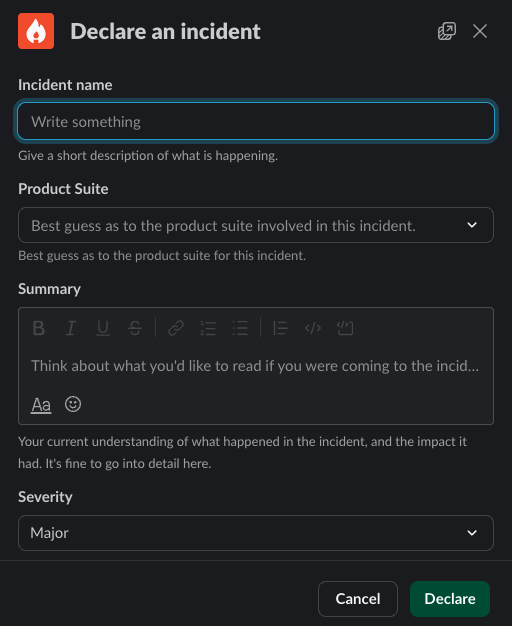
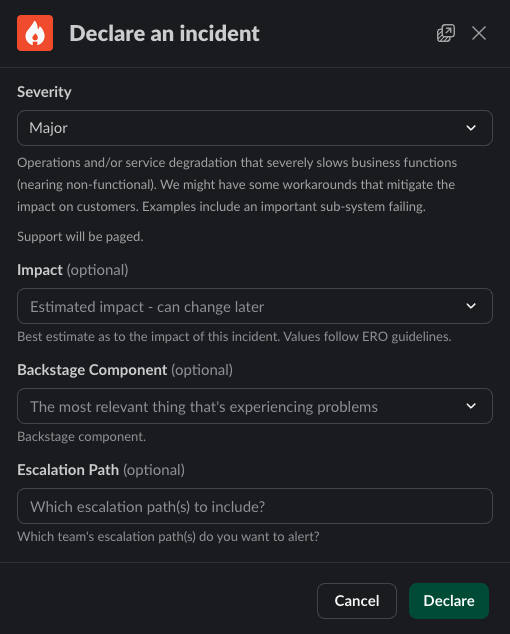
- Use the command
/incfrom any channel. This will start off the process below. - The bot will prompt you to supply the relevant information. Name, summary, product suite and severity are mandatory. All other fields are optional.
- When giving a title and summary you should give a succinct outline of the problem that we are currently experiencing and any known impact to customers. This can be updated after the channel is made and the right people are engaged. Taking 30-60 seconds to add context to the incident announcement will help everyone!
- Severity is “best guess” based on what you know when you open the incident. This can always be changed during or after the incident. Refer to the Enterprise Priority Matrix as needed.
- If you know the specific technical component that is having problems, you may select it from the list of Backstage Components. This will trigger a page to the team that owns that component.
- If you know which team you need, or want, to include in the incident, you may select their escalation policy from the list. This will trigger a page to that team’s on-call responder.
- The bot will:
- Create a dedicated Slack channel for this incident, and announce the incident to the #incidents channel.
- Start a Google hangout and place the details to join that call in the channel as well as pinned.
- Add a few Slack groups to the channel.
- Post a few helpful links at the top of the channel.
- You may want to
/inc pageto page additional responders.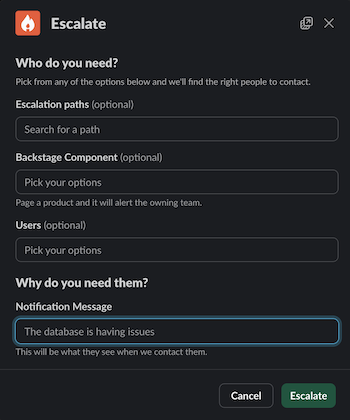
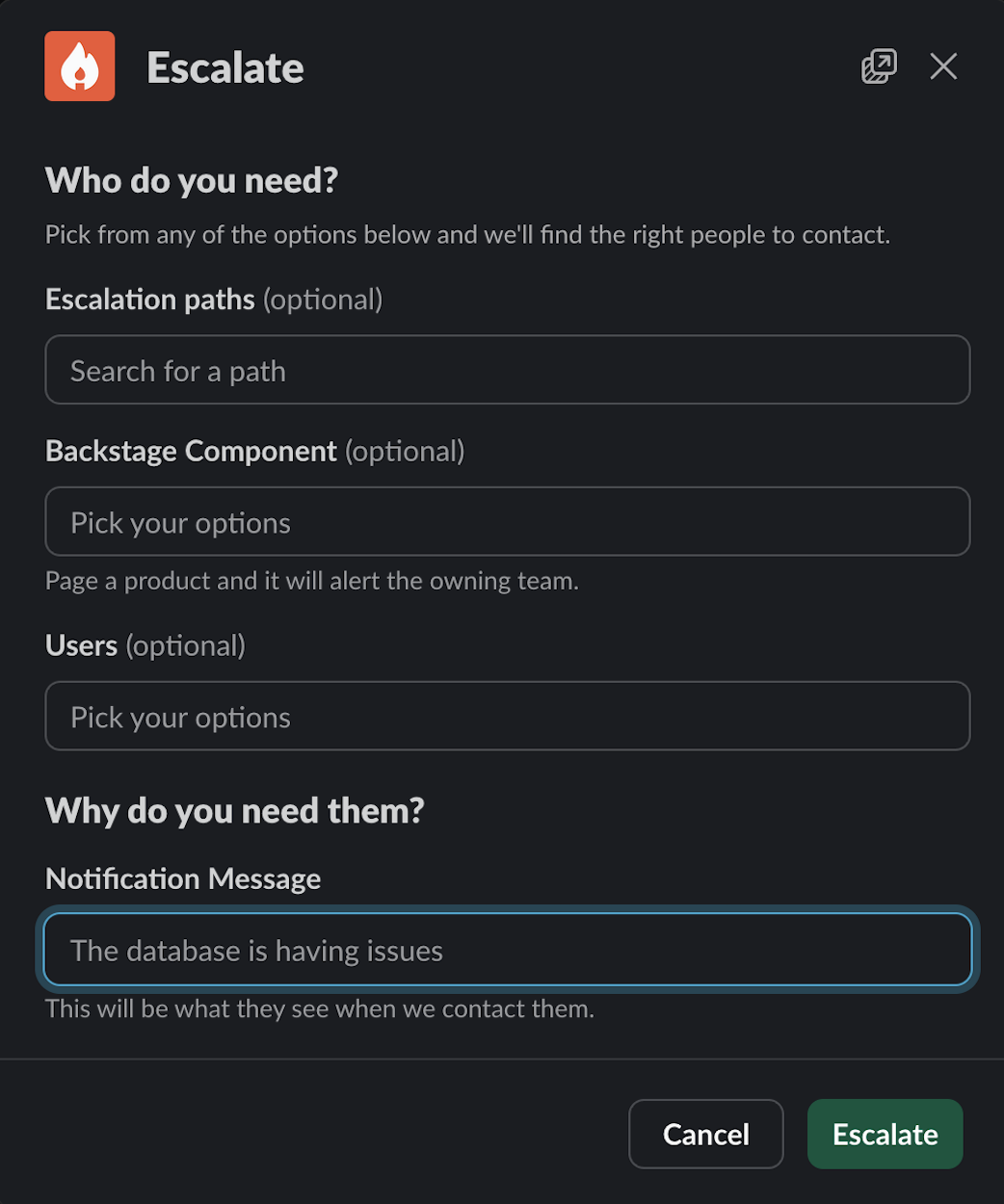
- If you know the team you want to page, you may select them from the list of Escalation Paths. If you know the thing that is broken, you may select it from the list of Backstage Components, and then Incident.io will page the primary on-call person for the team that owns that thing. You may optionally page one or more specific human beings, but this should be an exceptional case: you should always page an Escalation Path or Backstage Component first.
Note: after the incident has started you don’t need to stick around unless you are fulfilling one of the other roles.
Incident Coordinator
Role: Coordinate the effort, and prevent us from stepping on our own toes.
Who: Anyone. There is no special requirement for serving as coordinator. This is an administrative role, focusing on managing the process of the incident.
- Join the incident channel and the Google call.
- Identify yourself by saying “I’m taking Coordinator for this incident!” in the call and in Slack.
- Then type
/inc role lead @namein the incident Slack channel, supplying your Slack handle. This will ensure that the Incident bot sends you timely reminders.
- Then type
- Share your screen. Show the relevant dashboards or log pages. This allows everyone on the call to see the same things, and discuss observations.
- You may delegate this task as needed.
- Ask people what they are doing. The engineers working the problem may go “heads down” for extended periods of time. Simply ask for a status report on a regular cadence (say, every 5 to 10 minutes). “No update” is a perfectly acceptable response!
- in the absence of information, humans tend to jump to conclusions. The point of asking for regular updates is to minimize this tendency.
- Ensure that changes happen one at a time. In the heat of the moment, humans naturally want to jump to action. The coordinator’s job is to provide a safety valve against this tendency, and ensure that we change only one thing at a time.
- Use
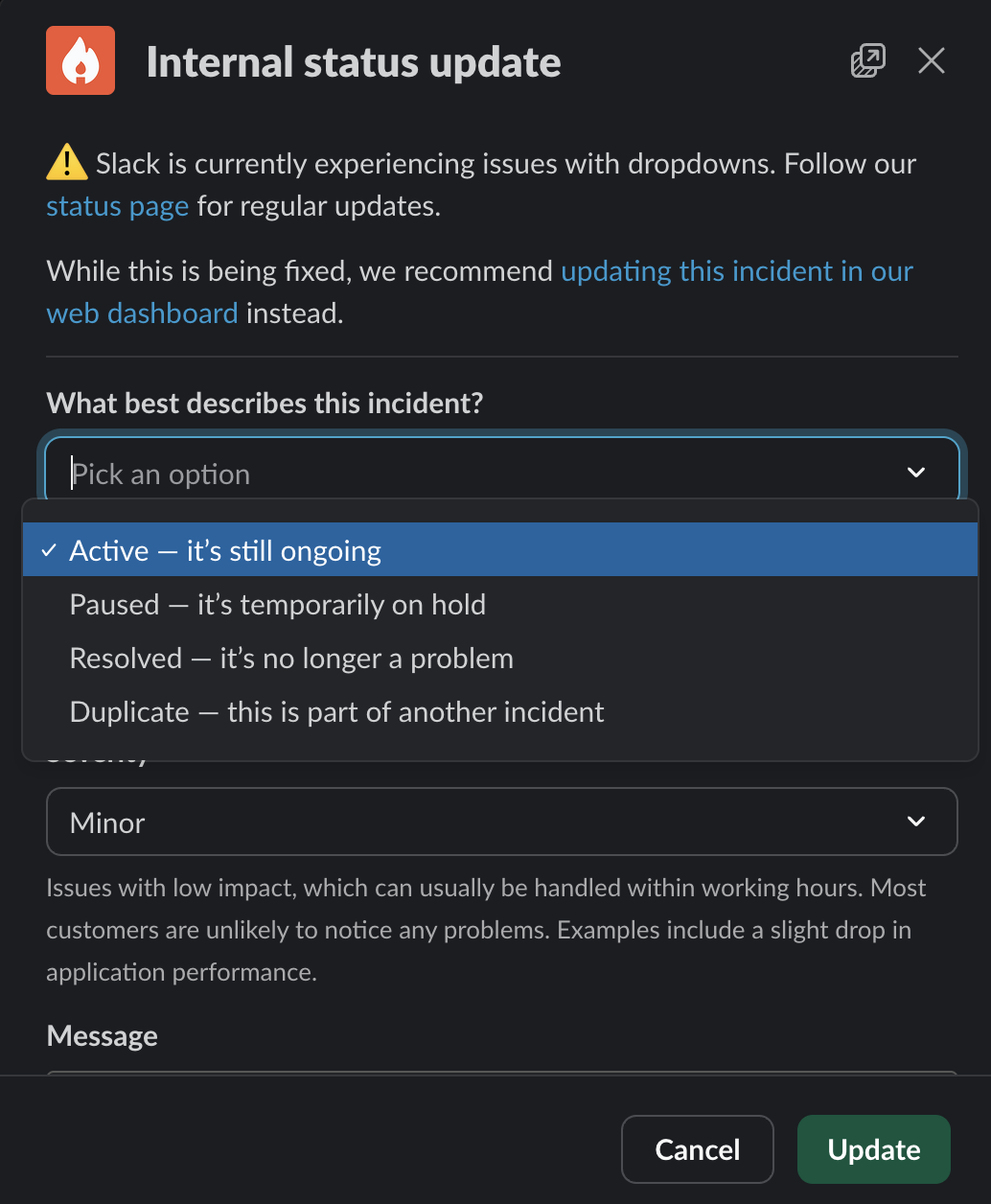
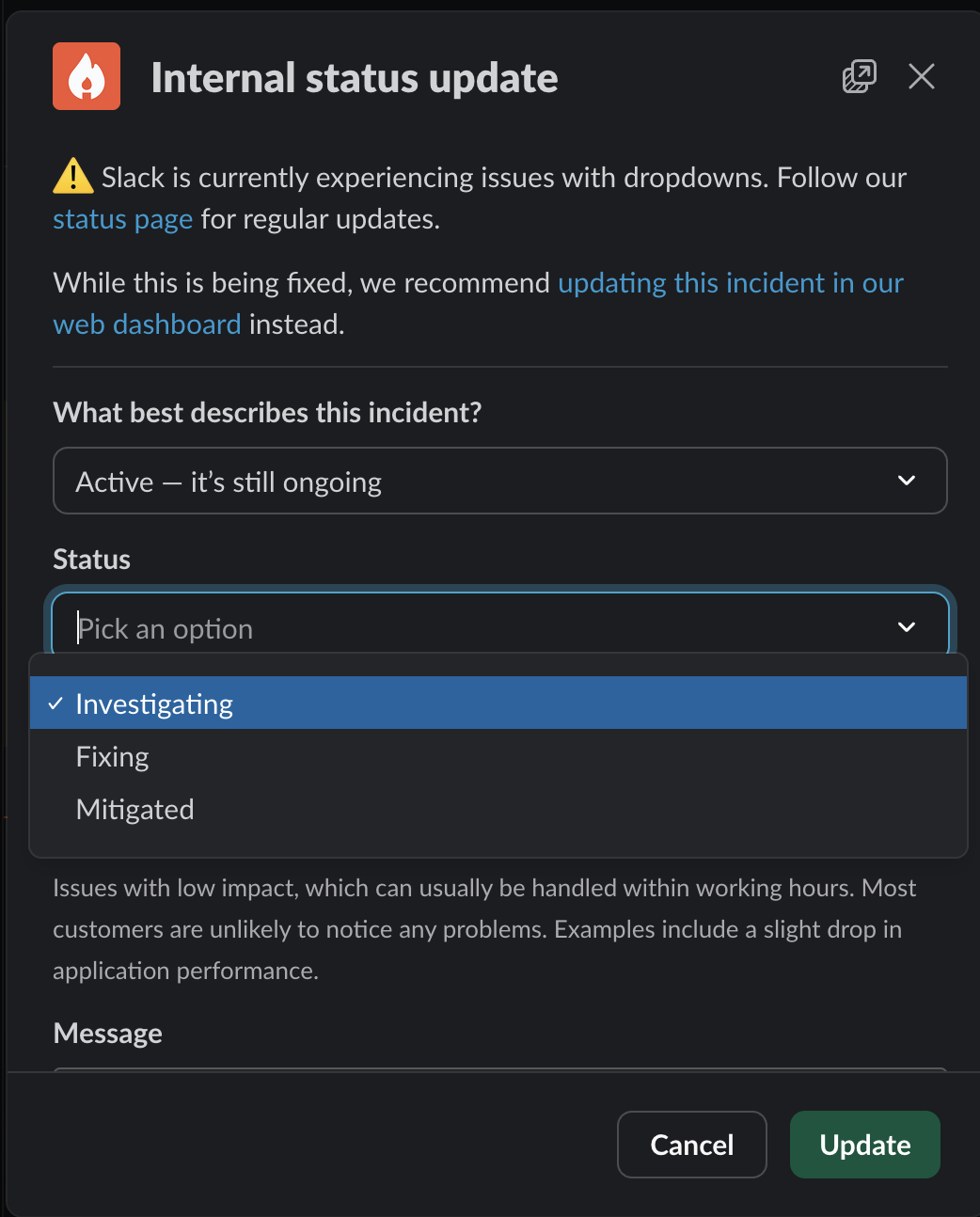
/inc statusto record changes to the incident. It is helpful for the historical record to know when an incident was mitigated, resolved, or paused. An active incident can be in the “investigating”, “fixing” or “mitigated” stages. Other stages for incidents include “active”, “paused”, “resolved” and “duplicate”.
- Announce “all clear” when the incident has been resolved, and use
/inc close.
- “Resolved” here is a somewhat fuzzy notion: generally it should mean “the customer experience has been restored”, but there are many situations where a fix may be deployed that will take some time for customers to benefit from it.
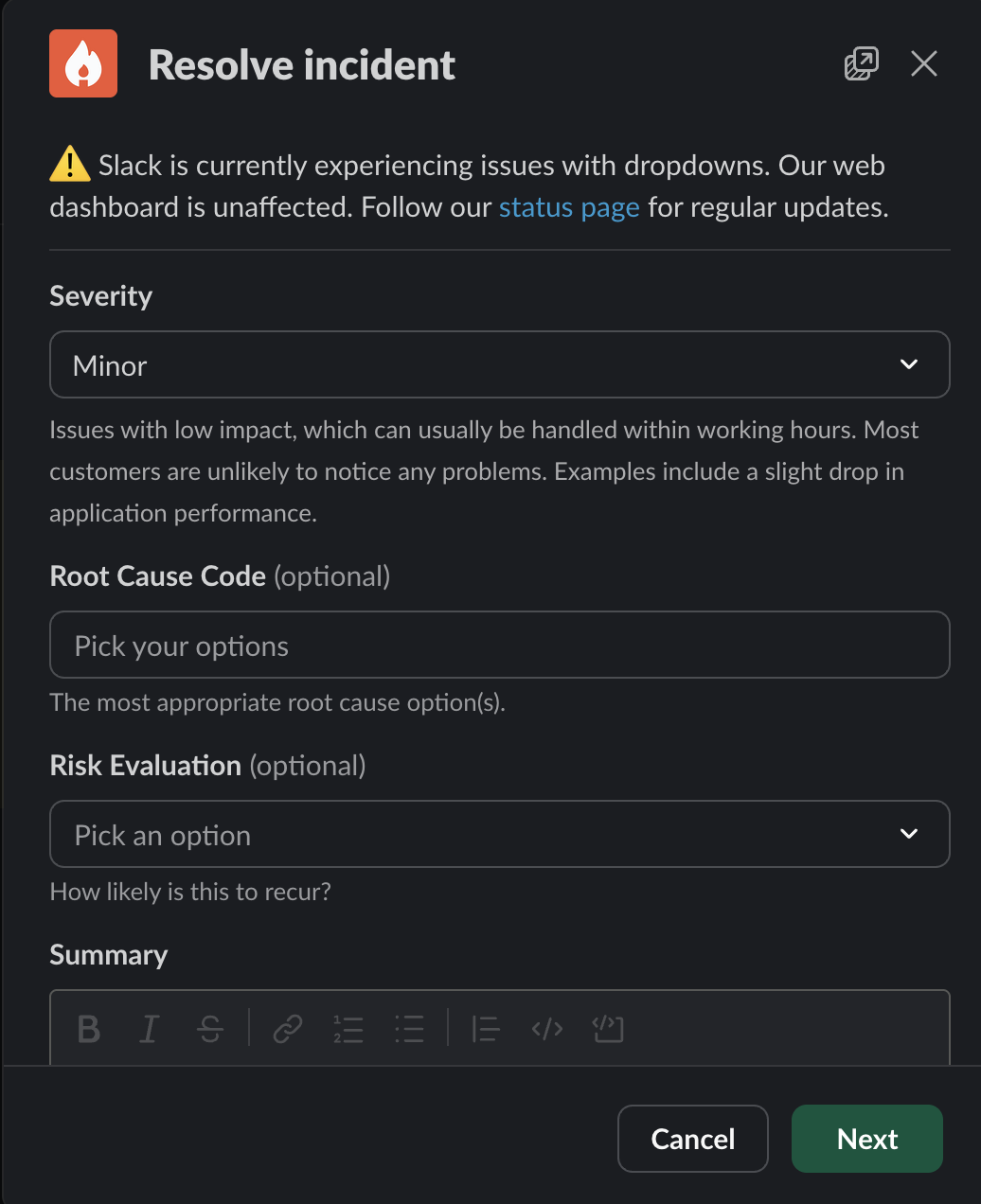
- When closing an incident, you have the option to change the severity and impact. If the situation has changed since the incident was open, this is a good time to make sure you record it accurately. If impact had not previously been set, it will now be required.
- You must also assign a risk evalutation of how likley you think this incident is to occur again. These values are defined by the Enterprise Resilience Office. Use your best judgement.
- You may also optionally update the summary. Often when an incident is opened, we provide a very loose summary based on extremely incomplete information. As the incident unfolds we gain more understanding of what is happening. You may update the summary to include the new information.
Scribe
Role: Capture things stated aloud on the call and record them in Slack.
Who: Anyone. There is no special requirement for serving as scribe. It is often extremely helpful to have someone from a different team taking notes during an incident, to allow all members of the teams involved in triage and repair to be focused on their tasks.
- Try to capture in the Slack channel any relevant items from the Google call. If an engineer says they’re about to do something, post a message of that so that there is a timestamped record. Use the
/inc statuscommand to record status updates.
Note: You may transfer note taking responsibility to someone else as needed. You’re not stuck on the call forever! Simply ask for someone else to start taking notes.
- When participants type messages into Slack – including links to logs, graphs, images, etc – the Scribe can use Slack emoji to trigger Incident activites:
| emoji | action |
|---|---|
💥 :boom: | Turns the message into an Action |
⏩ :fast_forward: | Turns the message into a Follow-up |
📌 :pushpin: | Pins the message to the incident’s timeline |
📣 :mega: | Turns the message into an Update |
Note: Incident will only import messages into the timeline that it has been told about. The Scribe must use /inc status or tag messages with emoji in order to make Incident aware of them!
Engineer
Role: Investigate the issue and remediation
- Join the Slack channel and Google Meet.
- Investigate what is causing the degradation of services or user experience
- If you’re the on-call engineer and need help, reach out to who you think could help. If you need an infrastructure engineer page their firefighter.
- We have a blameless culture. If you think you need someone then page them. There is no harm done by paging more folks than might be needed.
- Collaborate with Operational staff involved in the incident to keep a current status of the user experience
- share in the call or in Slack any relevant information as you discover it. Knowledge is power!
- Once the issue(s) have been found, resolve the issues with the help of anyone else that’s needed.
- always state out loud what tasks you intend to take before you take them. This gives everyone a chance to identify any unintended consequences that may occur. It also allows the Incident Coordinator to enter this information into Slack for a timestamped record.
- Once an incident is over the engineering team deemed to have owned the solution has two responsibilities:
- Incident Analysis - within 48 hours a postmortem should be conducted. This is a facilitated meeting that reviews the timeline of events, captures estimated customer impact, and identifies any contributing factors. This meeting will produce an executive summary to share with support and leadership. We will use the Incident.io Post-Incident flow when the incident is closed.
- Root Cause Analysis (RCA) - after the postmortem is performed, the team(s) will have approximately two weeks to complete a more comprehensive root cause analysis. In many scenarios the incident analysis meeting will be sufficient to also complete the RCA, but some incidents may require deeper analysis. This may take time and focus, and we don’t want to rush teams through this.
Support
Role: Communication During an Incident.
- The current FF should join the Slack channel and Google Meet.
- Gather specific information about the experience of our customers to share with the engineering teams triaging the issue.
- Open a Parent Case if 10+ cases have been reported.
- Update the Platform status with verbiage provided by Leadership through the lifecycle of the incident.
- Notify all of support by posting the incident details in #team-banno-retail-support tagging @support-banno-apps
- Case assigner continues to assign non-incident related cases to reps in queue.
- If an “all hands” is called, everyone (Tier 1 & Tier 2) should be assisting with incident cases.
Leadership
Role: Assist with external communication.
- Join the Slack channel and Google Meet.
- Begin to understand the scope of the issue and determine if updating Platform status is necessary.
- Provide Support team case verbiage. 4 .Send SLAs:
- A yellow or red SLA should be sent as notification to customers of the impact. Until resolved, the status page will be used accordingly to provide updates.
- Following resolution, a green SLA should be sent to notify that all services are fully operational
- If it is determined that the incident is caused by a team/service outside of our stack, you should immediately engage the Enterprise Resilience Office (ERO) that runs a corporate Incident Management process. You reach the ERO by calling 417-236-8900 to declare a major incident and they will begin pulling in the appropriate teams within JH and be responsible for the high level reporting that is sent to all appropriate stakeholders.
Useful Links
Incident.io has a wealth of in-depth guides about how to run effective incidents, perform meaningful post-incident analyses, and reduce the burden of being on-call.