Banno does not yet have a CDN for static assets. See the previous discussion and infrastructure issue for some background.
Email Assets
For the short term, an Azure Storage has been created for images used in our emails. Because it acts like a CDN, images should not be removed from it, only added. To add images:
By default, your Azure account should be in the Banno UX Team Azure Active Directory group. If you have trouble doing the below steps, contact #org-tech-ops or #org-infrastructure to verify group membership.
- Use a tool like Azure Storage Explorer to connect to the Storage Account.
- Once set up, you should be able to access the container. In Azure Storage Explorer, you can navigate to it from the left pane under
Prod_Digital_Banno/Storage Accounts/bannoinstituionassets/Blob Containers/email.
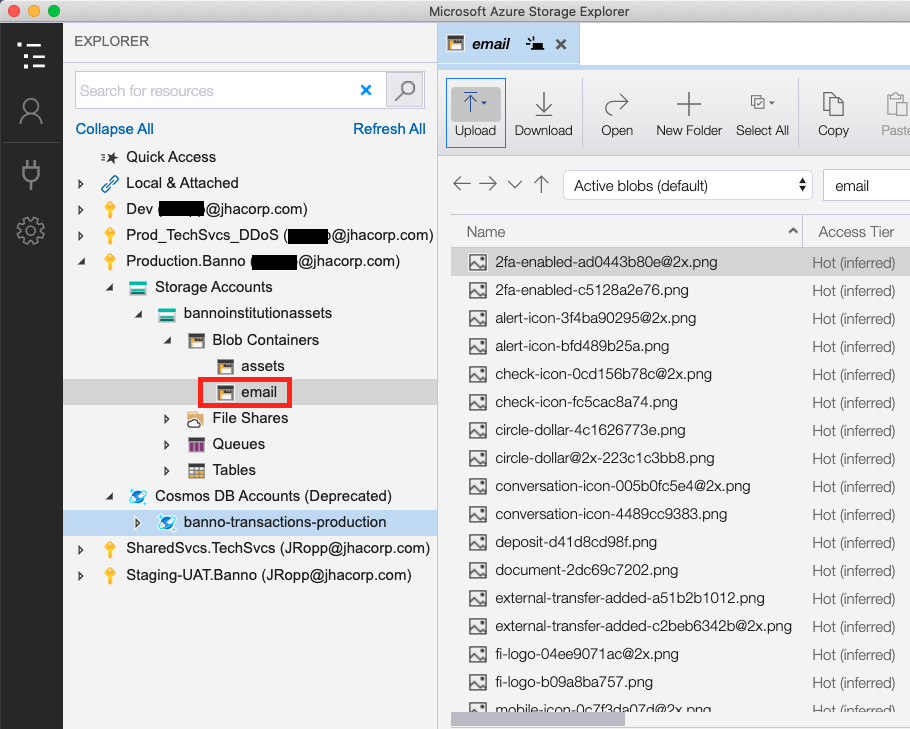
Add a hash to each filename to fingerprint them. E.g.
2fa-enabled.pngbecomes2fa-enabled-ad0443b80e.png.You can calculate the hash of a file using a tool like
md5sum(from the Homebrewmd5sha1sumpackage). Only the first 10 or so digits need to be included, so that the filename doesn’t get too long.Upload the file to the
emailcontainer.You can get the URL of the file by right-clicking on the file and going to “Properties”, or by prepending the container URL (shown in the Properties panel) to the filename.
For more info, see the related infrastructure docs.